Getting started
Build your first page
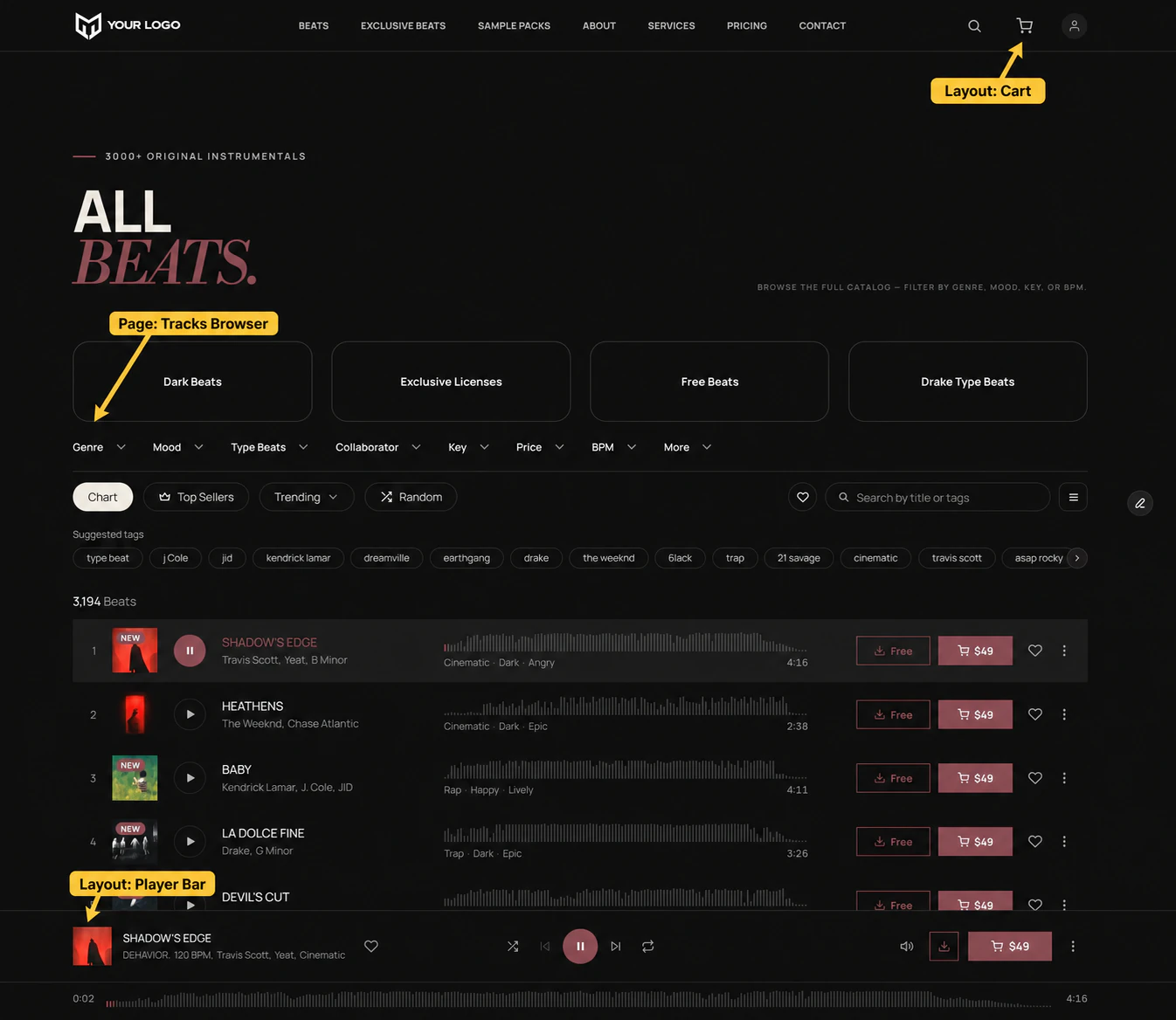
A browse page is the smallest useful store: a catalogue people can filter, play and buy from. It is four components, and two of them belong in your layout template.
Put the furniture in a layout template
Create a Framer layout template with your nav and footer, and add Soundee Setup and the Player Bar to it. Pin the player to the bottom.
Every page built on that template now has both, and you change them in one place instead of eighteen.
Drop in a browser
On the page itself, insert Tracks Browser from the plugin. That single component is the filter bar, the suggested tags and the list — already aligned with each other.
Set Layout per breakpoint
On the desktop breakpoint leave it on Desktop; on the phone breakpoint set it to Mobile. That swaps the row of dropdowns for a floating Filters button and a sheet.
Add a cart button
Put Cart Button in your nav. It shows the live item count and opens the cart that Soundee Setup draws.
Publish
Publish the site as usual. Preview and published are separate builds — the editor can look right while the live site is still yesterday’s.
Where to go next
A browse page is enough to sell from. The next thing most stores want is a page per track, so people can land on one from a search result or a link.